- Product

- Pricing
- Affiliate Program
- Developers
- Resource
 EN
EN.png)
As one of the most popular social media platforms, Facebook has millions of users worldwide. However, there are times when you could face issues with your accounts, and one of the most common issues is a Facebook account being suspended for 30 days.
Facebook's enforcement system has evolved significantly. In 2026, Meta processes over 2 billion account reviews monthly using AI and human moderation teams combined. Understanding the new detection landscape is crucial for account protection.
When you receive these messages, it means that your account has been suspended for 30 days:
Your account has been banned for 30 days because you violated our Community Standards
Your account is temporarily suspended because your profile doesn’t list your authentic name
Your account has been suspended for 30 days because you repeatedly posted things that don’t follow our Terms
In this article, we will talk about the possible reasons why your account could be suspended for 30 days, and most importantly, how to avoid your Facebook account from being suspended moving forward. This guide reflects the latest 2026 policies and helps you understand why accounts get suspended, how to appeal effectively, and most importantly, how to prevent future bans using modern tools and strategies.
Content Violations: Posting prohibited content (violence, hate speech, extreme political content) - even sharing images with sensitive text can trigger AI detection
Behavioral Red Flags: Adding 20+ friends in 24 hours, sending mass messages, or rapid link sharing
Device Fingerprint Mismatches: Logging into multiple accounts from the same device without proper isolation
Identity Inconsistencies: Profile picture not matching name, or account details appearing fabricated
Community Reports: Content flagged by multiple users triggers manual review
Copyright Issues: Using others' videos or music without permission
Facebook's 2026 AI analyzes patterns across:
Device fingerprints and IP geolocation
Login frequency and operation timing
Content signals and engagement patterns
Browser parameter consistency
Facebook's system uses Community Standards to determine account violations. Triggering these rules can result in a 30-day ban.
Posting prohibited content: violence, gore, pornography, hate speech, political extremism, etc. Sometimes, even sharing a simple image with sensitive text can be mistakenly flagged.
Posting images or videos containing nudity, violence, or gore.
Sharing content flagged as fake news or misleading.
Frequently adding strangers or sending mass messages: Adding friends, sending private messages, or sending mass promotional links in a short period.
Using multiple accounts on the same device: Frequently switching between multiple Facebook accounts on the same computer or phone.
Fake identity or false information: Falsified account information, profile picture not matching real name, unusual name, etc.
Massive reports: Content or behavior repeatedly reported by other users will be manually reviewed by the Facebook team, sometimes resulting in a 30-day ban.
Uploading copyrighted material, such as other people's videos or music.
Facebook's AI now analyzes long-term behavior patterns across multiple dimensions including device fingerprints, IP addresses, operation rhythm, and content signals. Accounts showing bot-like or automated patterns face immediate suspension.
Using anti detect broswers with cheap or datacenter proxies triggers automatic detection. When broswer parameters simulate a regular user device but IP addresses belong to servers, Facebook flags this as suspicious automation activity.
If your IP address points to one country, your payment card is from another region, and your system timezone/language settings don't match, Meta's risk systems flag this as suspicious and may suspend your account.
Accounts without 2FA enabled are now considered high-risk and more likely to face restrictions. Meta uses 2FA as a signal that you're a legitimate human user, not a bot.
Logging into multiple Facebook accounts from the same IP address or device triggers suspension warnings. This is especially problematic for businesses managing multiple client accounts.
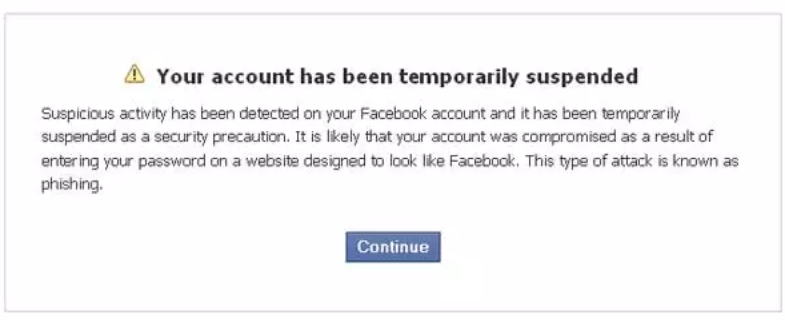
If you genuinely don't know why your Facebook account is suspended, you can open the Support Inbox and check the system's violation notification. Click "See details" in the notification to find out which post was flagged as a violation. Sometimes it's just a misidentification, in which case you can appeal.
Many people panic when they first encounter this situation, wondering if a 30-day Facebook suspension means their account is gone.
Actually, there's no need to worry too much. A 30-day suspension is a temporary penalty and does not mean your account is permanently deleted.
✅ You can:
Log in to your account to view ban notifications;
Visit your profile and old posts;
View your friends' activities (sometimes partially visible);
Use Messenger (some accounts are still available).
❌ But you cannot:
Post, comment, like, or share content;
Add friends, join groups, or send private messages;
Use advertising accounts, business pages, or fan pages;
Change sensitive information (such as name, email, etc.).
Meta has made significant changes to its enforcement approach in 2026 that directly impact account suspensions:
AI-First Detection: Large Language Models (LLMs) are now integrated as an additional review layer, making detection more sophisticated and reducing false positives.
Community-Driven Moderation: Meta is shifting toward community notes and user-reported enforcement, meaning your content may be reviewed based on user reports rather than proactive scanning for certain types of violations.
Stricter Age Verification: Following Australia's under-16 ban, Meta has removed over 550,000 accounts and implemented more aggressive age verification. If your account information appears inconsistent, you may face restrictions.
Teen Account Protections: New restrictions for users under 16 include parental consent requirements for live streaming and direct message features. This affects how accounts are categorized and monitored.
Enhanced Algorithm Monitoring: Systems now track long-term behavior patterns rather than just single violations. This means repeated minor issues can accumulate into a 30-day ban even if individual infractions seem minor.
IP-Browser Mismatch: Using residential proxies with datacenter-detect browser parameters
Geographic Inconsistency: IP in one country, payment in another, timezone in a third
Missing 2FA: Accounts without two-factor authentication are marked high-risk
Multi-Account Activity: Same IP/device accessing multiple Facebook accounts
Facebook's notification system has changed:
Minor violations: Usually receive a warning with specific violation details
Severe violations: Immediate suspension without warning (spam, fake accounts, fraud)
AI-detected patterns: Account restrictions based on behavioral analysis, not just content
Check Your Status:
Support Inbox: Shows violation notifications and ban reasons
Account Quality: Displays account health metrics
Important: Avoid frequent login attempts or multiple appeals - this flags additional suspicious activity
Step-by-Step Account Recovery Process (2026 Updated)
Go to Facebook → Support Inbox or Account Quality
Look for specific violation codes and dates
Check which post/action triggered the suspension
Click "See Details" to understand the context
Critical: Enable 2FA before appealing (required for appeal access)
Use a clean IP address (residential proxy matching your account location)
Avoid the same device/browser that triggered the ban
Clear cookies and browser cache
Visit: https://www.facebook.com/help/contact/260749603972907
Submit ONE appeal with:
Clear, factual explanation
Evidence of compliance (if applicable)
Professional tone, no emotional language
English language preferred
Attach ID verification if requested
Review time: 3-7 business days (2026 standard)
Minor violations: Often resolved in 24-48 hours
Severe violations: May require full 30-day suspension
Results sent via email and Support Inbox
Do NOT submit multiple appeals
Do NOT create new accounts during appeal period
Do NOT repeatedly log in to check status
If Your Appeal is Rejected:
Option 1: Wait It Out
30-day suspensions auto-lift after the penalty period
No action required during waiting period
Account typically restored automatically
Option 2: Create New Account (With Proper Isolation)
Use a different IP address and device
Never reuse the same browser fingerprint
Implement anti detect browser from day one
Use MoreLogin for complete account isolation
Avoid immediate content posting - warm up the account gradually
Option 3: Prevent Future Bans
Separate personal and business accounts
Use dedicated browser profiles for each account
Maintain consistent login patterns
Monitor account quality metrics regularly
2026 Prevention Strategy:
❌ Avoid These High-Risk Behaviors:
Posting identical content across multiple accounts
Adding 50+ friends in the first week
Using the same IP for multiple Facebook accounts
Posting copyrighted material without permission
Sharing sensitive or controversial content
Rapid message sending or link sharing
✅ Adopt These Best Practices:
Use anti detect browsers (MoreLogin recommended) for account isolation
Maintain consistent login times and locations
Enable 2FA on all accounts
Follow Facebook Community Standards strictly
Monitor Support Inbox for early warnings
Use residential proxies when necessary
Separate personal and business account environments
Follow official Facebook Business Help resources
If you want to make sure that your account does not get suspended in the future, in addition to stick to the community terms of service, you can also try using an anti detect browser to make sure that your Facebook account has its isolated Internet environment and does not get tracked by the Facebook platform.

An anti detect browser is a tool that can help you avoid Facebook account suspension by hiding your browser's fingerprint. This means that Facebook cannot track your activity and identify any suspicious behavior that may result in a suspension. anti detect browsers are commonly used by online marketers and spammers, but they can also be used by legitimate users who want to protect their privacy and avoid being flagged by Facebook.
In terms of the most recommended anti detect browser, MoreLogin is definitely at the top of the list.
MoreLogin is one of the best anti detect browsers available today. It is designed to protect your online privacy and prevent you from being detected by Facebook. MoreLogin uses advanced technology to simulate a real browser profile, making it almost impossible for Facebook to identify your activity as suspicious. MoreLogin also uses proxy servers to hide your IP address and location, further increasing your privacy and security.
One of the key features of MoreLogin is its user-friendly interface, which makes it easy for anyone to use. The browser is also regularly updated to stay ahead of Facebook's detection algorithms, ensuring that you can continue to use it without any issues.
Now, let's have a look at how exactly you can use MoreLogin to create new browser profiles for your Facebook accounts so they don't get tracked by Facebook.
Step 1: Sign up free by clicking the following button, then download the software to your computer based on your operating system. The product comes in both windows and Mac versions so you can choose the one that suits your device. 
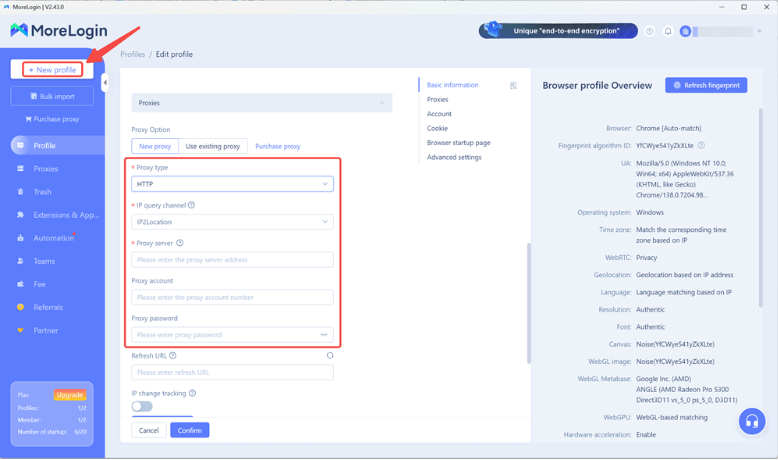
Step 2: Then launch the program and log in to the client. In the top left corner of the program interface, you will see a "New Profile" button. Click on it and complete the settings to create a new, unique web browser fingerprint.
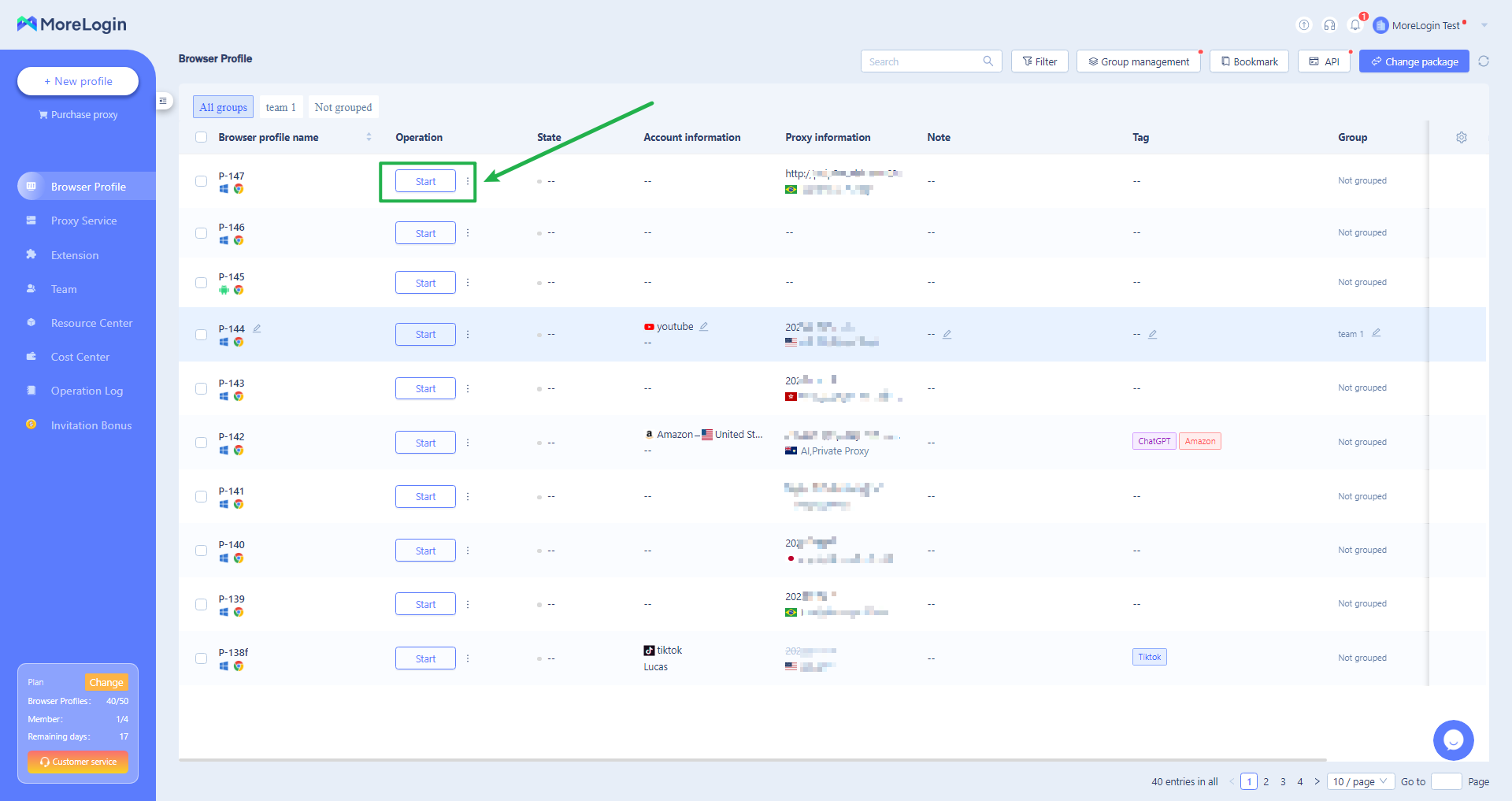
Step 3: Finally, go back to the "Browser Profile" page and locate the newly created browser profile. Click on the "Start" button to activate the new browser, where you can log in to your Facebook account without revealing your real identity.
Therefore, it is important to have multiple facebook accounts and assign them with different browser profiles in MoreLogin to make sure your business does not get iunterrupted by suspensions.
A: Yes, Messenger typically remains accessible, but functionality may be limited depending on the violation type.
A: No. Facebook can detect duplicate accounts and may permanently ban both. Wait for the suspension to end or follow proper recovery procedures.
A: Standard review time is 3-7 business days. Minor violations may be resolved faster.
A: For managing multiple Facebook accounts, yes. anti detect browsers like MoreLogin provide essential isolation that prevents cross-account detection.
A: No. Submitting multiple appeals will flag your account for stricter review and reduce success chances. Submit one well-prepared appeal.
Facebook account suspensions in 2026 are more sophisticated and challenging than ever before, but they're manageable with the right approach. Meta's AI-driven enforcement means that understanding why your account was suspended is just the first step. Successfully appealing suspensions and preventing future issues requires a combination of strict policy compliance, proper account hygiene, and modern tools like MoreLogin that provide the isolated environments needed for safe multi-account management.
There's no guaranteed way to avoid all account suspensions, but by following Facebook's rules, using advanced anti detection tools, maintaining consistent login patterns, and staying informed about policy updates, you can significantly reduce your risk and protect your business operations on Facebook's platform.
For more information:
 EN
EN